Early design for a semscreen interface as a WordPress extension for site-based deliberation. The interface is now modular, with potential portability for use on other platforms and protocols.
Here is our current working model of the UI, hot off the press:
*** If you don’t see it already check back June 8!***
Screenshot of current UI in development:
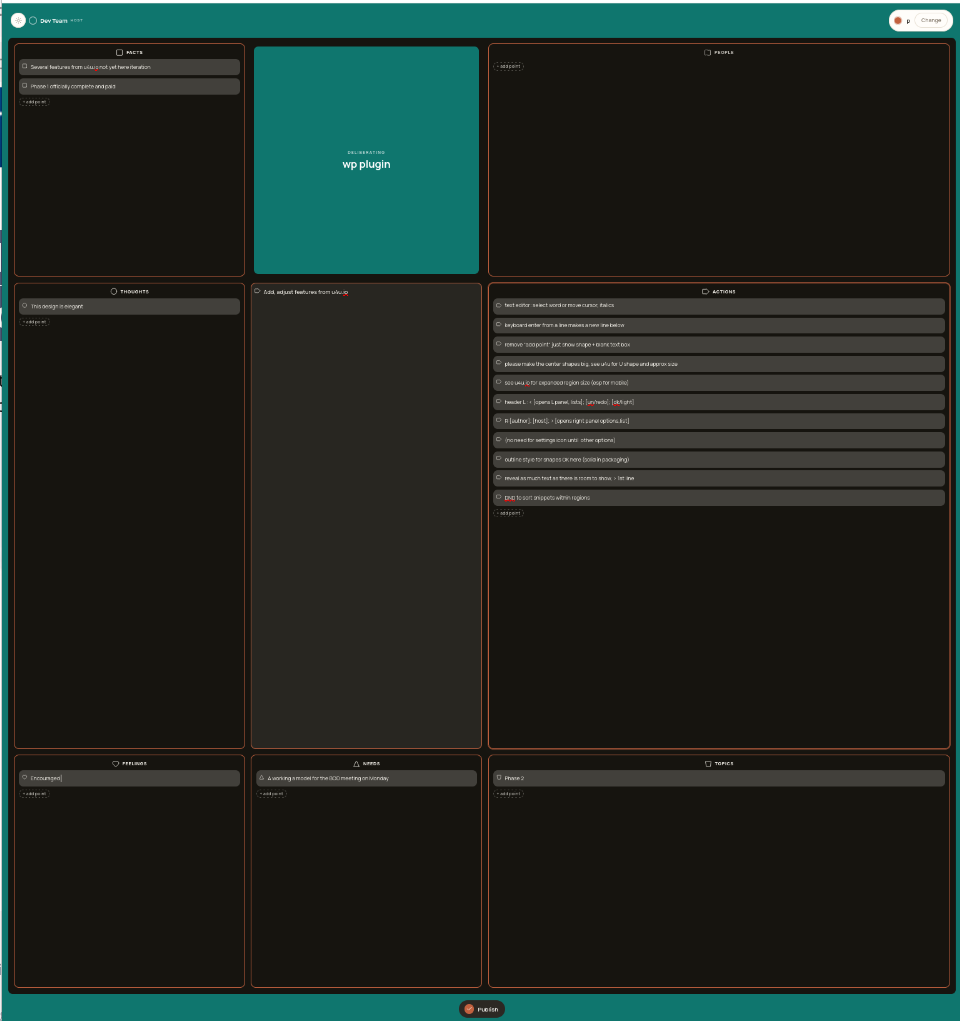
Actions region shows feature requests for the plugin this round:
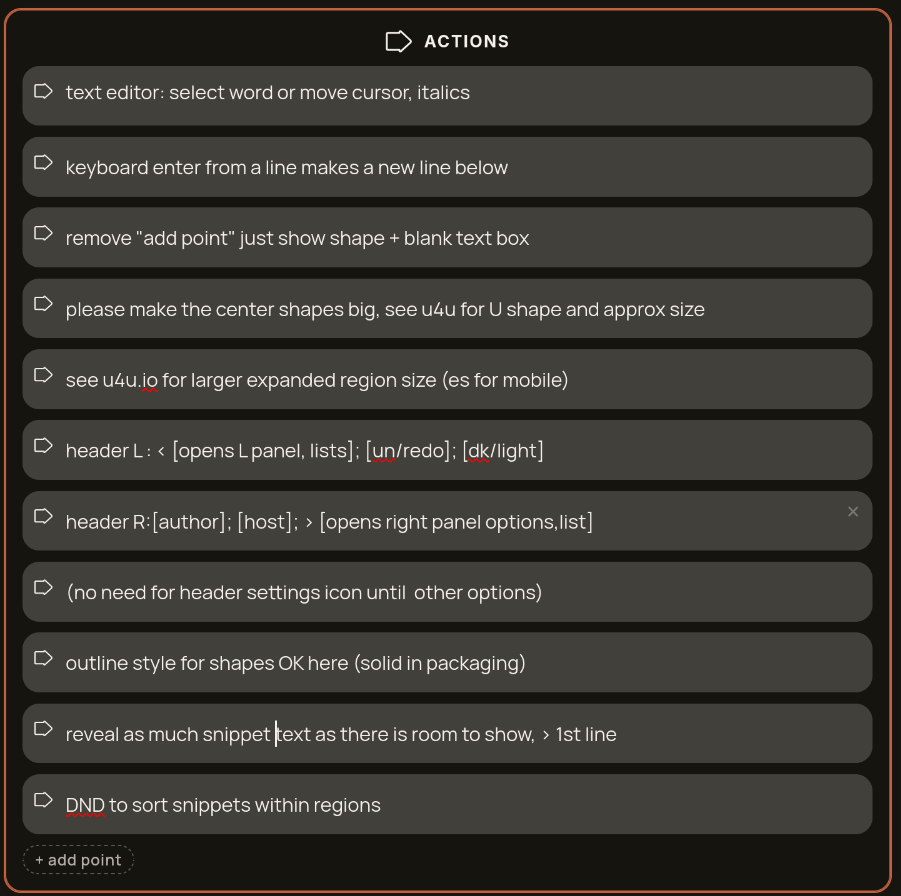
Other features, such as nested sub-points and their shapes to be added later, after this round’s second phase, which culminates in a WordPress plugin with publication on the website’s database, and list display of published input for the public on the site.
Later versions will give the site admin options to customize the plugin to suit their own scopes, terms, and options – including metrics for merit calculations.
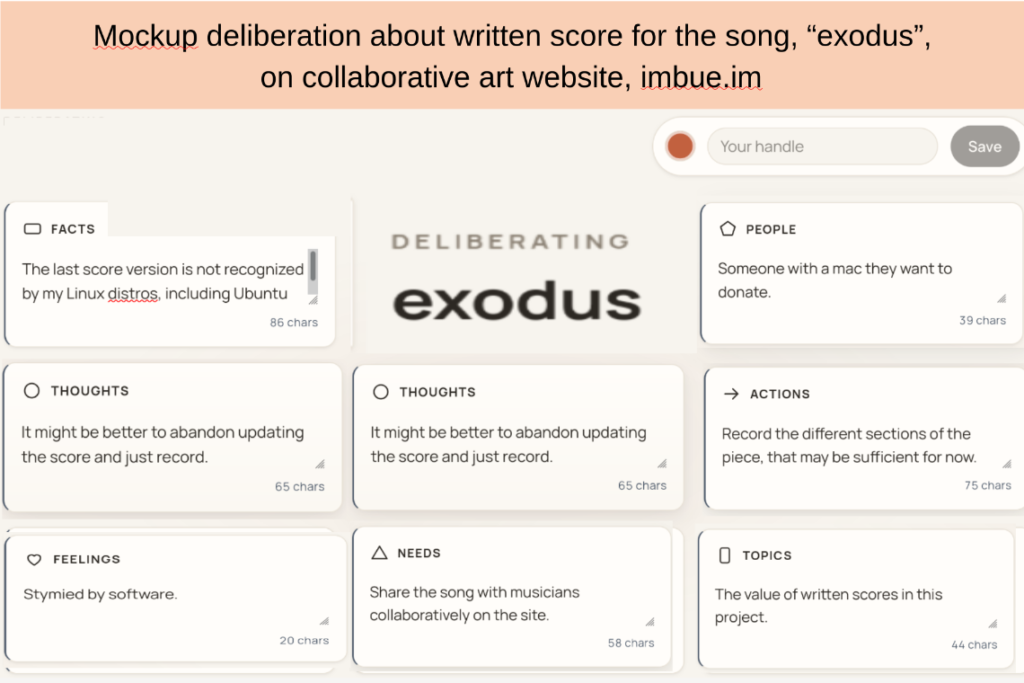
Here’s a mockup of ushering the process of music collaboration:
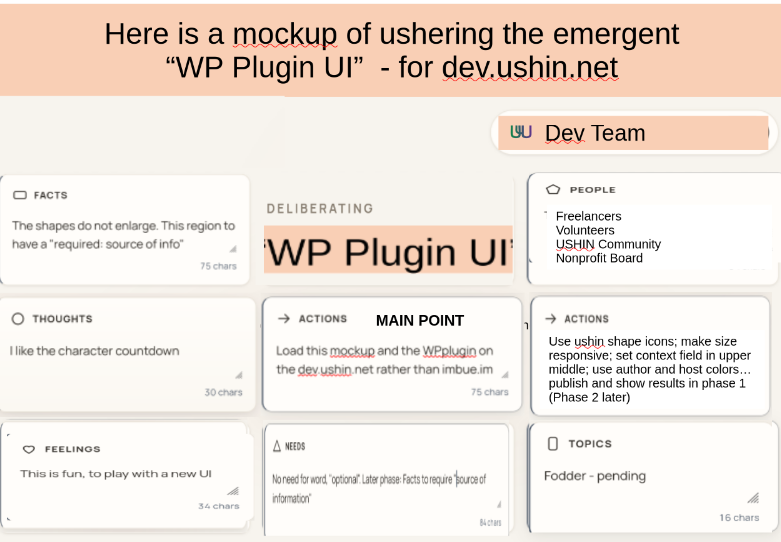
Our process in the making of this plugin:
The proposed WordPress Extension uses the U4U semantic screen, “semscreen”, for users to tag text and other objects and interact with results for collaborative deliberation.
Ushering the WordPress Plugin UI
Features
- See u4u.io for model of semscreen for responsive sizing and with drag-and-drop functionality to swap shape regions.
- Source code at https://git.sr.ht/~ushin/u4u/
- Pending merit calculations, and buttons for handling semscreens and views are not yet available in u4u. These new features, as they are developed for WordPress, will appear in the top center “Merits” region, which auto-expands for full screen when engaged.
- Hierarchical tagging: With the 8 shapes as parent tags the interface will allow parent-child relationships with user-generated tags.
- Text Tagging: Users can open a semsreen by
- clicking the ushin button to open a blank for creation and editing
- highlighting text or other object on the website and click ushin icon to open a semscreen with text in center for user editing and tagging, with app recall of original page and line saved as part of me
- paste or enter text into any region as in u4u.io
- view and select predefined labels, sub-labels
- Sub-tags and connection labels: Users can create
- within a semscreen region, forcing parent label of 1 of 8 ushin shapes
- at the child level, as 8 parent ushin tags are set.
- between 1 and 12 characters long with no char type or space restrictions
Approval Workflow
- Submitted tags are sent to site admins for review and approval. Curators can:
- view the input in context
- add their commentary within the deliberation
- handle the interaction privately with user
- in either case, select reasons from a checklist
- e.g., “inappropriate content,” “option to similar existing tags,” etc.)
- custom reason and private deliberation semscreens
- publish scope of deliberation
- publish enforce guidelines for media and text by disabling permissions
- disable user permissions
- involve both automated filtering and manual review
- After publication by curator users can
- see and use the list of tag submissions
- see the status of their tags (approved, pending, or rejected + why)
- create potential deliberation around tagging decisions.
Comprehensive Metadata
- Users can access:
- Timestamps: Displayed in the upper left corner.
- User ID: Shown in the upper right corner above the comment form.
- Tag History: Access user’s profile by clicking User ID
- Breadcrumb Navigation: Displays the path of their search in the middle of the upper row of the table-like form, helping users track their navigation.
- Labels and Sub-labels: Both predetermined and user-generated (and approved) labels are included in the metadata.
Media Attachments
- Users can attach and tag images, videos, and audio files
- Image Formats: JPEG, PNG, GIF
- Video Formats: MP4, AVI, MOV
- Audio Formats: MP3, WAV
- File Size Limits: Maximum file size for uploads is capped at 10MB per item.
Publish
- Users can:
- select the publish checkmark to open package view
- pick avatar name and color as in u4u.io
- view these choices with main point in center, bold, with surrounding support points
- shapes on the outer rim for ease of reading text near main point
- select the checkmark again to submit for curator approval for site publication
- select the publish checkmark to open package view
Stability of data
Though users cannot delete entries, except through the publishing curator, users can update one’s published tagged text input. Newer input replaces prior on search results display, and the current may or not point to prior by user/curator choice. When versions are published then, by default, the prior input will be redirected to the newest.
- Users can
- view original relationships even when points start new related deliberations,
- offer update of input for any reason, e.g. in response to notice of curator-denied/deleted tag, text or object
Search and Filter
- Users can
- view lists of individual search results in right panel (see u4u.io) headed with
- search box
- shape tags on far left always
- subtags, labels, dates, and the aforementioned metadata
- category types appear on drop down check box list for user selection
- autoexpand to full screen when >3 search criteria visible
- access separate displays for nested lists and complex deliberations
- publish and share filters and metrics for users to adapt
- view lists of individual search results in right panel (see u4u.io) headed with
Visual Displays
The semscreen is valuable for input and comprehensive understanding one point at a time. Deliberation requires connection capabilities to bridge different points and also deliberate the bridges. Initial WordPress experiments with ushin deliberations will be limited to single deliberations within a single website, e.g. about a song on the Imbue.im site. Comparison views will likely start with simple tables.
- Users can see and filter input, and connections between input, from multiple users in
- Tables: comparing multiple aspects of 2-3 items
- Branching Tree Display: hierarchical with original input on top or bottom
- Mind Map: show expanded deliberation and connections more clearly
- Overlap Screens: comparing 3-5 shapes at a time
- Potential view features may allow users to:
- expand individual semscreens
- select semscreens to view in this or other view
- navigate branch and map views with scroll e.g. mouse, keypad Arrow Keys
- drag fields to reposition their view
- drag and drop and re-order, or sort by set and custom criteria
- zoom in and out for detailed or broad overviews of main points
- select a point to view, and reply, in the semscreen
Notifications
- Users can choose how and when to be notified of updates
- Instant notifications via email or in-app alerts.
- Daily or weekly summaries of updates.
- Notifications based on specific tags or conversations.
Merits
- User and website curators select and create weights and measures for each of the shapes
- default lists and basic merit calculations provided with the interface
- customization of weights and measures by curator
- curator offers customization to users as well
Breadcrumb Navigation
- Users can follow their breadcrumbs in any search among different ongoing deliberations, to navigate backwards.
Connecting Deliberations
- Users can connect two points from different branches or site-hosted deliberations, labeling the connection with linking phrases such as “causes,” “results in,” or “is compared with.”
- Linking Phrases: A list of predefined linking phrases will be available for users to choose from, enhancing the clarity of connections between comments and discussions.
- Dynamic Connect Labels: When selected by any user, connect labels appear in the semscreen region for further tagging, enabling consistent use across deliberations.
Tag Recognition
- Interoperability: Tags created within the extension to be recognized by other sites or social media platforms using both standard metadata formats JSON-LD and universally recognized unicode.
- svg’s as on our websites
- pixilated shapes as on freeplane available
- ushin descriptions in rich metadata descriptions
- naming with ushin terms for recognitions USHIN Shapes in Unicode
| USHIN | Unicode Character | Description | Unicode Code Point |
|---|---|---|---|
| Thoughts | Circle | copy from u4u.io | U+25CF |
| Facts | Square | “ | U+25A0 |
| Needs | Triangle | “ | U+25B2 |
| Merits | 8-Point Star | “ | U+2736 |
| Actions | Right Facing Arrow | “ | U+2794 |
| People | People | “ | U+1F462 |
| Topics | Tag | “ | U+1F3F7 |
| Feelings | Heart | “ | U+2665 |
Profiles
- list user published input
- private list of user drafts
- search histories with filters deriving results
- peer lists if consistent with host
- followed, blocked if trust systems in place by host
- contact info beyond the app, websites, soc med, email …
- optional avatar image (does not show in deliberations by default)
- fallback avatar colors common with other clients (XEP-0392),